





Table of Contents
Submit the Form Below to Unlock Up to 20% Discount
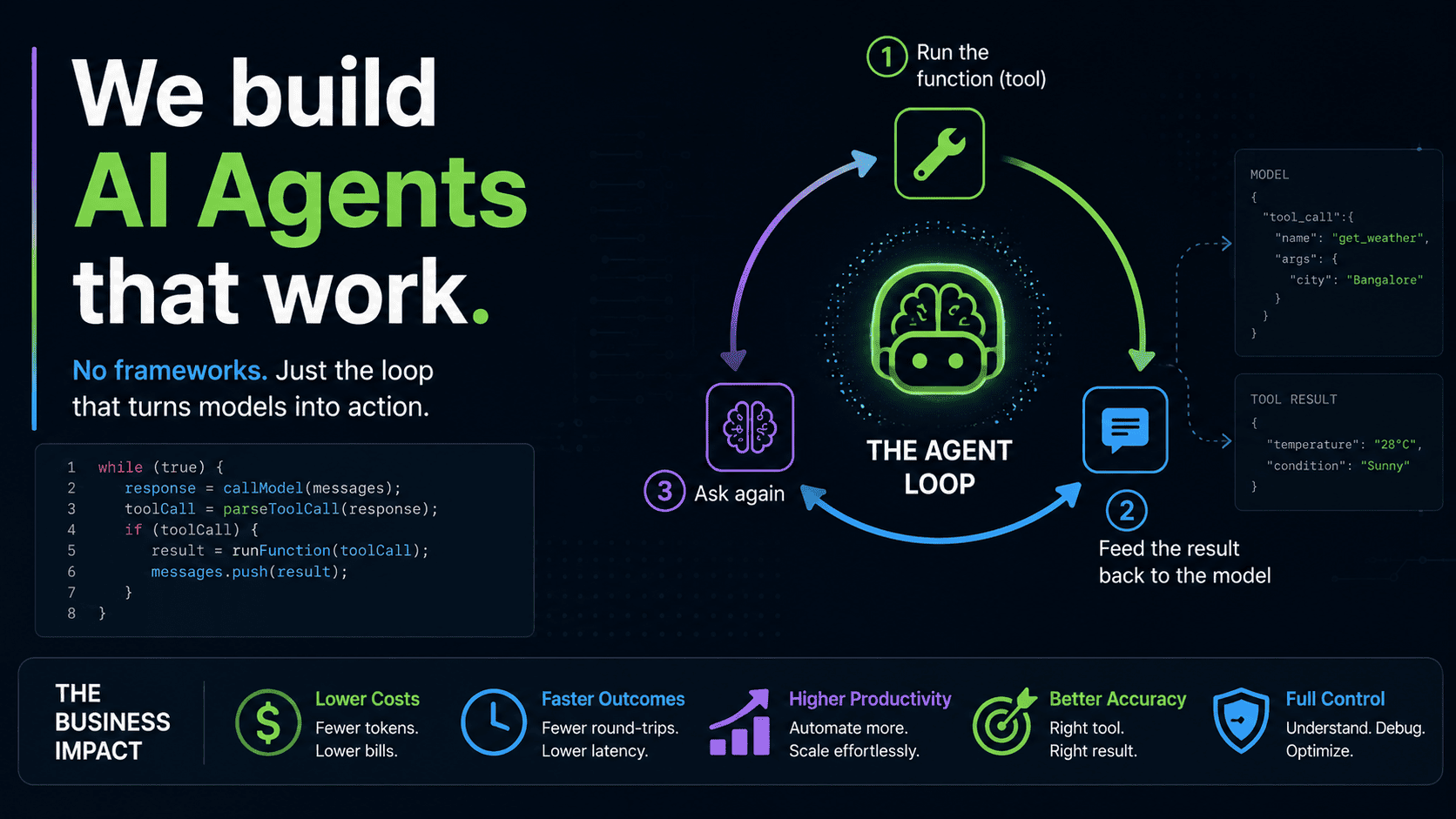
Every week another framework promises to make AI agents easy. Chains, graphs, nodes, executors, memory managers, retrievers. Read enough documentation and you start to believe an agent is a genuinely complicated piece of software.
It isn’t.
An AI agent is a language model, a few ordinary functions, and a loop that decides when to call them. That’s the entire idea. Everything else — every framework, every abstraction layer — is convenience wrapped around those three parts.
This guide builds a complete, working tool-calling agent in plain JavaScript/TypeScript. No LangChain. No LangGraph. No agent framework of any kind. The whole thing fits in one file, and by the end you’ll understand exactly what those frameworks are doing on your behalf.
What an “AI Agent” Actually Means
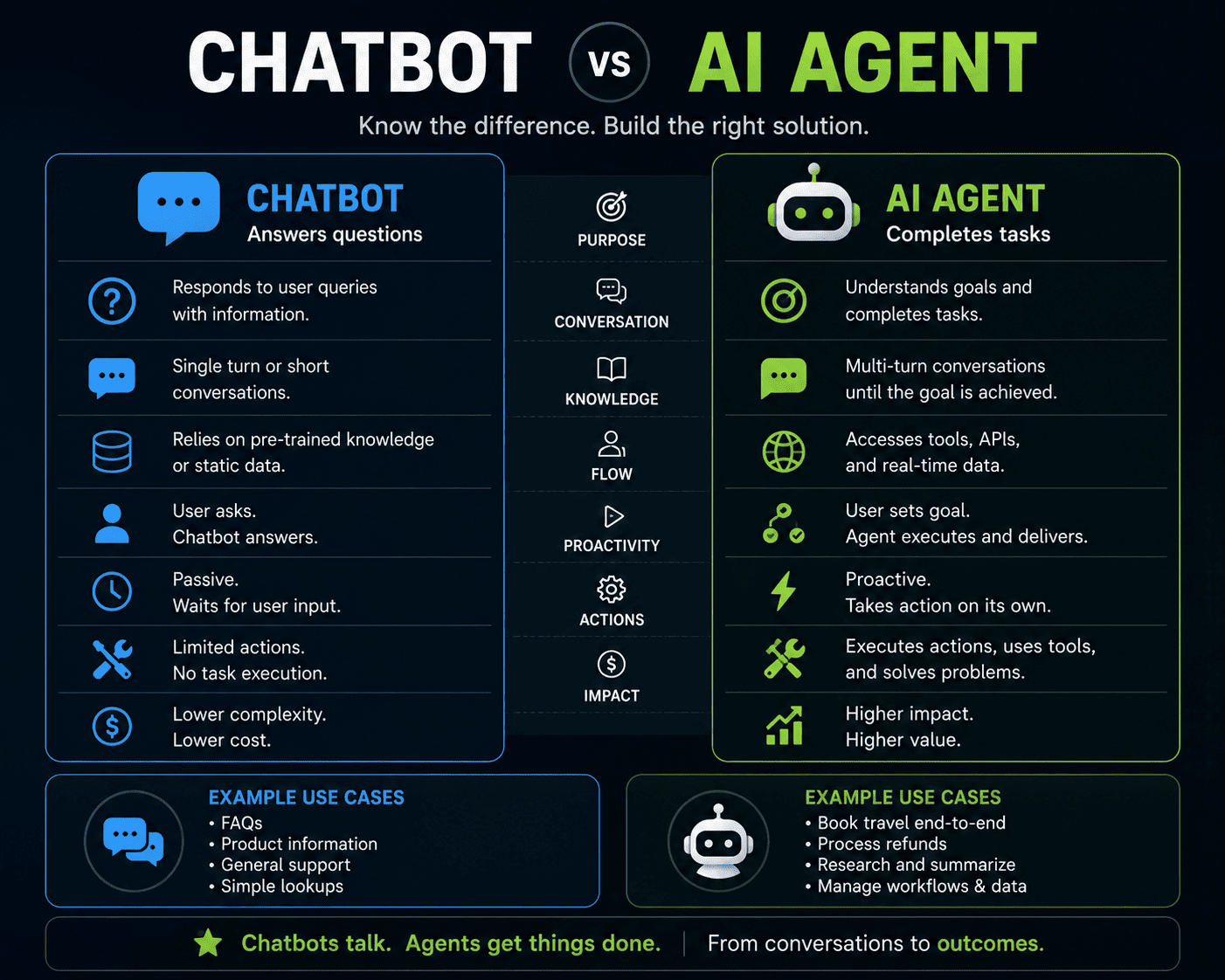
A normal chatbot does one thing: you send text, it sends text back. It has no way to touch the outside world. Ask it today’s weather in Kolkata and it will either guess, hedge, or tell you it can’t check.
An agent adds one capability: the model can ask your program to run a function, then continue reasoning with the result.
That’s the whole difference. The model doesn’t execute anything itself — it can’t. It just says, in a format you agreed on in advance, “I’d like you to run the weather tool with the location Kolkata.” Your code reads that request, runs the function, hands back the answer, and asks the model to try again. Now it has real data.
The loop that makes this happen is what turns a chatbot into an agent.
Why Skip the Frameworks (At Least Once)
LangChain and LangGraph are useful in production. They handle retries, streaming, tracing, structured outputs, and a dozen edge cases you’d otherwise write yourself.
But if the first agent you ever build is a framework agent, you learn the framework — not agents. When something breaks at 2 a.m., you’ll be debugging an abstraction instead of a program you understand.
Build it by hand once. It takes about eighty lines. After that, every framework’s documentation reads like a description of code you’ve already written.
The Four Building Blocks
Before any code, hold these four pieces in your head:
- A tool — a plain function that does something useful.
- A description of that tool — written into the system prompt so the model knows it exists.
- An agreed response format — so your code can tell “the model wants a tool” apart from “the model is answering.”
- A loop — that runs the tool, feeds the result back, and asks again.
That’s it. Let’s build each one.
Step 1: Write the Tool — It’s Just a Function
There is genuinely no magic here. A tool is a normal function you’ve decided to run when the model asks for it.
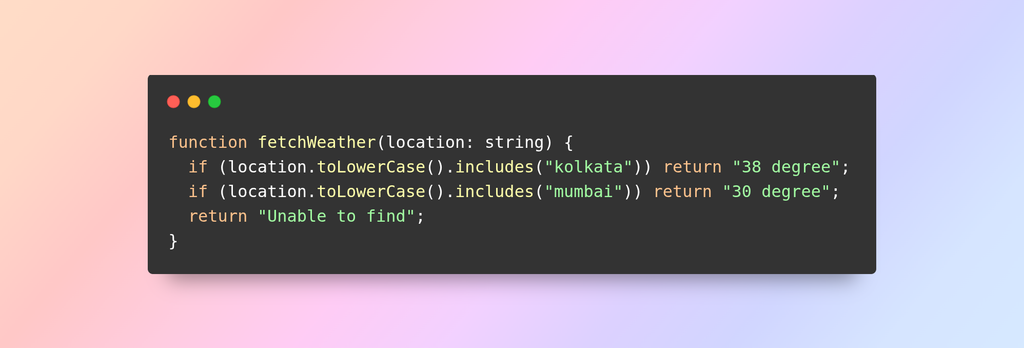
Hardcoded values, for teaching. In a real build this hits a weather API, queries your database, reads a file, sends an email, or checks stock in your inventory system. The model doesn’t care what’s inside — it only sees the name, the parameters, and the string that comes back.
This is the single most important idea in agentic AI. A tool is a function. Nothing more.
Step 2: Tell the Model the Tool Exists
The model has no automatic knowledge of your codebase. You describe the tool in the system prompt — its name, what it does, what parameters it needs, and when to use it.
Notice rule 1. A tool call is optional. If the user asks “what is 2+2”, the model should just answer. Deciding whether to reach for a tool is part of what the model is doing — and it’s why prompt quality directly affects agent quality.
Step 3: Agree on a Response Format
Here’s the practical problem: the model replies with text. Whether it’s answering you or requesting a tool, it’s all just a string. Your code needs to tell them apart.
The solution is markers — two arbitrary strings that would never appear in ordinary conversation:
tcSTART[{“tool”:”fetchWeather”,”params”:[{“key”:”location”,”value”:”Kolkata”}]}]tcEND
tcSTART and tcEND are invented. You could use <<TOOL>> or ###CALL### or anything else unlikely to show up naturally. Their only job is to make a tool call detectable inside an ordinary text reply.
If the reply contains tcSTART, it’s a tool request. If it doesn’t, it’s the final answer. That single check drives the entire control flow.
Step 4: Parse the Tool Call
Once you’ve spotted the marker, extracting the payload is basic string work:
Cut out the text between the markers, JSON.parse it, and you’re holding a normal JavaScript array of objects. From here it’s ordinary programming.
Wrap that JSON.parse in a try/catch. Models occasionally emit slightly malformed JSON — a trailing comma, a stray newline — and an unhandled parse error will take your process down.
Step 5: Run the Tool
Loop the array, check which tool was requested, execute it with the parameters the model supplied:
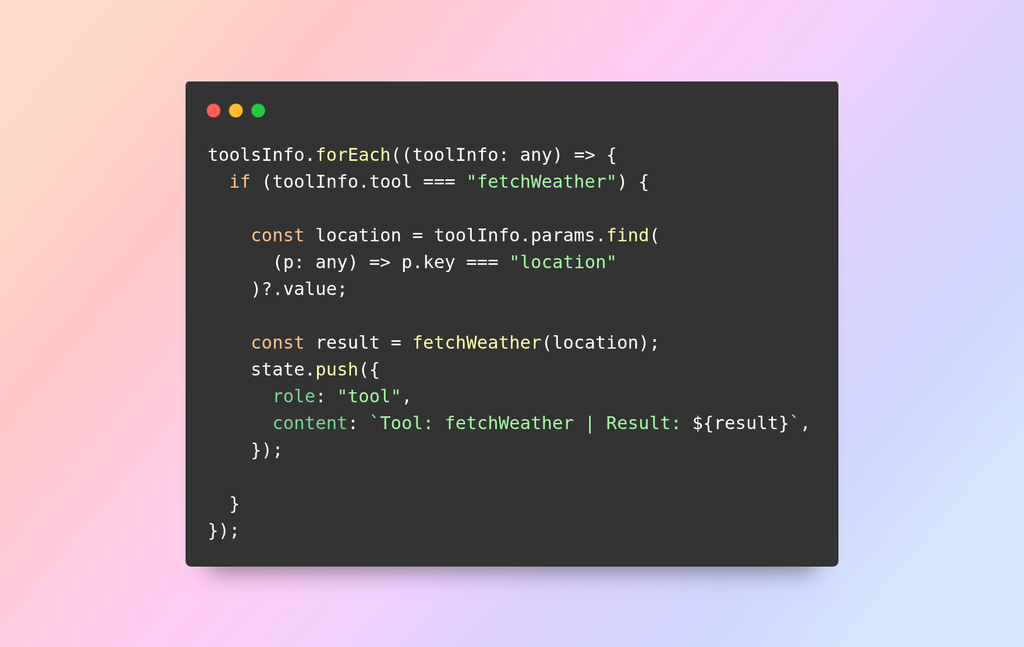
Note that the array can contain more than one tool call. A model asked about Kolkata and Mumbai may request both in a single reply — which is why you loop rather than handle a single object.
Never trust the parameters blindly. The model generates them, which means they’re user-influenced input. If your tool touches a database, a file path, or a shell command, validate before you execute. Every tool is an attack surface.
Step 6: Feed the Result Back — and Call Yourself Again
This is the step that makes it an agent.
Push the tool result into the conversation state as a tool message, then call the agent function again:
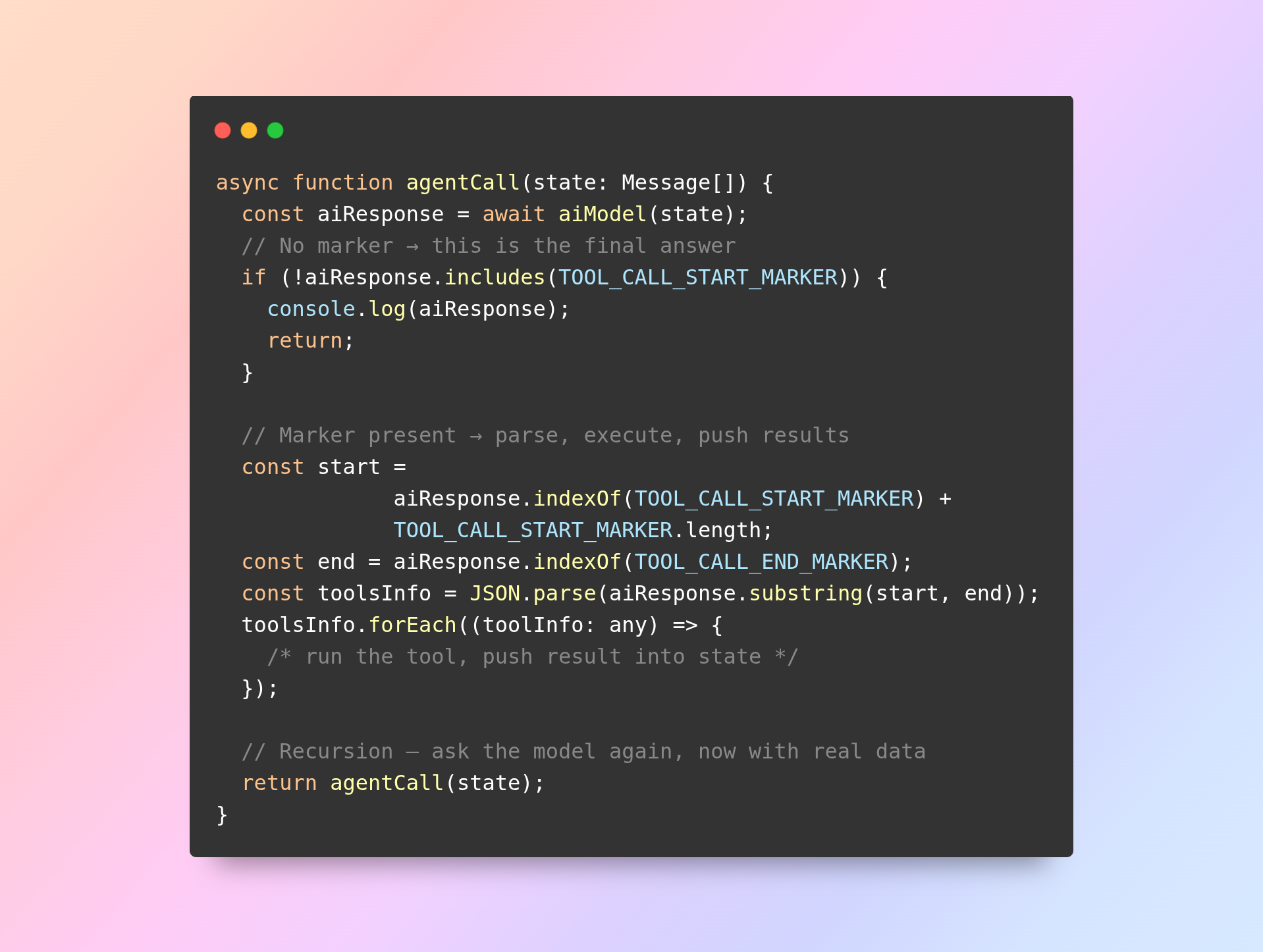
agentCall() calls itself. That’s the loop. The model now sees the original question plus the tool result, and can finally answer properly.
Step 7: Exiting the Loop
The recursion stops when the model replies without a tcSTART marker. No marker means no tool needed, which means the model is done thinking and is giving you the answer.
Print it, return, exit.
In production, add a hard limit — a counter that stops the recursion after, say, ten iterations. Models can get stuck in loops, requesting the same tool over and over. A depth cap is cheap insurance against a runaway API bill.
The Whole Loop in One Picture
Read that top to bottom and you have the complete architecture of every AI agent ever built. Frameworks add features around this shape. They don’t change it.
The State Array Is the Memory
There’s a detail worth pausing on: agentCall() mutates the same state array on every pass.
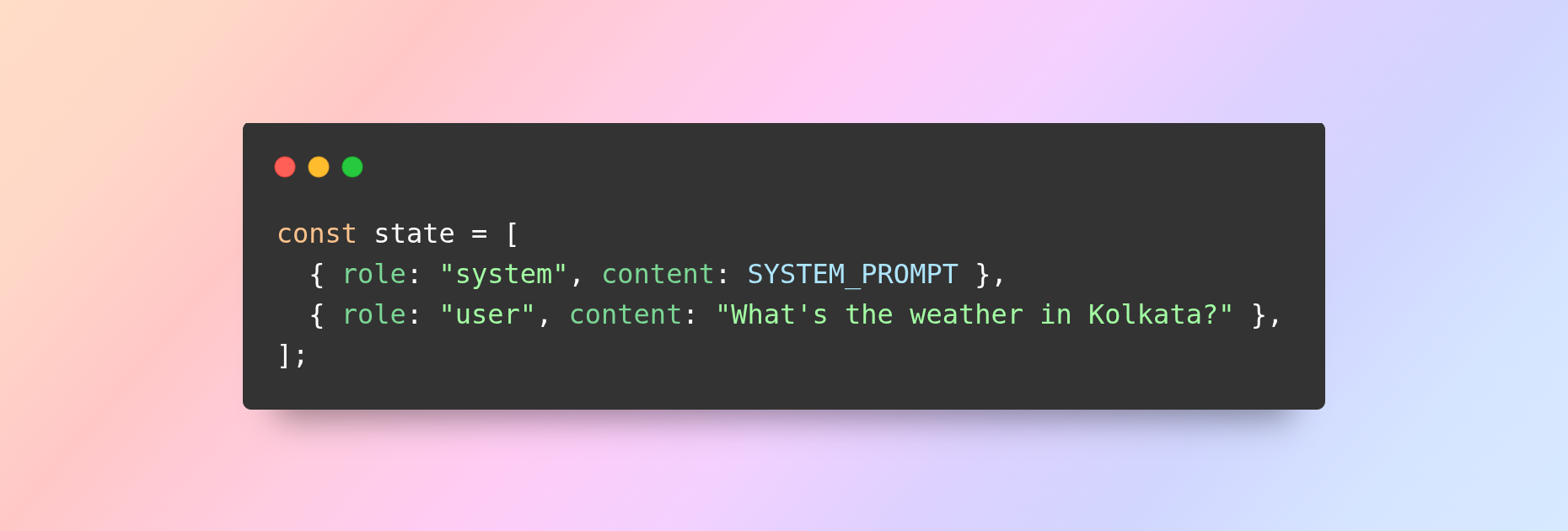
Each tool result gets pushed onto that array. Each recursive call sends the whole thing to the model. So by the third iteration the model can see the original question, its own earlier tool requests, and every result that came back.
That accumulating array is the agent’s memory. When a framework advertises “conversation memory,” this is what it means — an array that keeps growing.
It also explains why long agent runs get expensive. Every iteration resends the full history, so token cost grows with each step. Production agents trim, summarise, or window that array to keep it manageable.
Adding a New Tool: Three Steps
Extending the agent is deliberately boring:
- Write the function. Any normal JavaScript function.
- Describe it under ## TOOLS in the system prompt.
- Handle its name in the toolsInfo.forEach block.
That’s the whole extension story. No registry, no decorator, no schema compiler. Three steps.
Taking This to Production
The hand-rolled version teaches the concept. A few things change when it goes live:
Swap the model freely. aiModel() is the only function that talks to your provider. Point it at Ollama, OpenAI, Anthropic, or any HTTP endpoint — everything else stays identical. That isolation is worth preserving.
Use native tool calling. Most providers now expose structured function-calling APIs that handle the parsing for you and return clean JSON instead of markers. Use them. The marker trick exists here so you can see what those APIs do internally — but in production, let the provider do it.
Handle failures properly. Tools call networks, and networks fail. Wrap every tool in try/catch and return a readable error string to the model rather than crashing. Models handle “Error: weather service unavailable” gracefully; they don’t handle a dead process at all.
Add timeouts and a depth cap. A hung API call shouldn’t hang the agent, and a confused model shouldn’t loop forever.
Log everything. When an agent misbehaves, you need the exact state array that produced the bad reply. Log each iteration.
Common Mistakes Worth Avoiding
- Vague tool descriptions. If the model doesn’t know when to use a tool, it’ll either ignore it or call it constantly. Description quality is agent quality.
- Too many tools. Fifteen tools in one prompt and selection accuracy drops sharply. Group related tools or split into specialised agents.
- Forgetting the loop guard. The most common way a first agent burns money.
- Trusting model-supplied parameters. Validate before executing.
- Assuming a single tool call per reply. Loop the array.
What You’ve Actually Learned
You now know what’s under every agent framework: a system prompt describing some functions, a detectable reply format, a parser, an executor, and a recursive call that keeps going until the model stops asking for tools.
That’s it. That’s agentic AI.
Frameworks are worth using — they solve real operational problems. But you’ll use them better having built the thing they abstract. The next time a LangGraph node diagram appears in a README, you’ll recognise it immediately: it’s agentCall() with better tooling around it.
Full working code: github.com/guptasomnath/Ai-Agent
Frequently Asked Questions
Do I need LangChain to build an AI agent? No. LangChain is a convenience layer. An agent needs a model, a tool description, a parser and a loop — all of which you can write in plain JavaScript in under a hundred lines. Frameworks become genuinely useful once you need tracing, streaming, retries and multi-agent orchestration at scale.
What exactly is a “tool” in an AI agent? An ordinary function in your codebase that you’ve described to the model in the system prompt. When the model decides it needs that function, it emits a structured request; your code parses the request and executes the function. The model never runs code itself.
Why use markers like tcSTART and tcEND instead of native tool calling? Purely for teaching. Markers make the mechanism visible — you can see the model requesting a tool as plain text. Production providers offer native function-calling APIs that do this parsing for you, and you should use them.
Can this agent use multiple tools in one turn? Yes. The parsed payload is an array, so a model can request several tools in a single reply. That’s why the code loops over toolsInfo rather than handling one object.
How does the agent remember previous steps? Through the state array. Every tool result is pushed onto it, and the entire array is resent on each recursive call. That growing array is the agent’s working memory — and the reason long runs cost more tokens.
Does this work with any AI model? Yes, provided the model reliably follows formatting instructions. The aiModel() function is the only provider-specific code. Swap it for OpenAI, Anthropic, Gemini or a local Ollama model and the rest of the agent is unchanged.
